



搜索到
74
篇与
的结果
-
 NW.js将Web端打包成客户端安装包 NW.js将Web端打包成客户端安装包前言项目交付时需要将Web端后台入口打包成exe安装在客户电脑上,本文记录一下操作流程。使用csharp为客户端封装壳的时候,打包建议使用.NET Framework 3.5.1 SP1作为构建框架,可以支持Windows7系统,我当时使用了4.8打包的程序无法在Windows7中打开,结果现场在客户机器上操作一番装其他的环境才得以解决。各系统的支持情况如下:Windows版本自带的.NET Framework 版本Windows 7.NET Framework 3.5.1 SP1Windows 7 SP1.NET Framework 3.5.1 SP1Windows 8.NET Framework 3.5.1 SP1 + 4.5本文不涉及套壳,套壳当时只是为了校验客户机的mac地址。一、创建app.nwapp.nw就是打包后的web页面,操作流程如下:1.使用Npm初始化一个含package.json的目录package.json如下,参数基本一眼就知道什么作用{ "name": "大兴社保", "main": "index.html", "version": "1.0.0", "window": { "frame": true, "icon": "logo.jpg", "width": 1400, "height": 1100, "position": "center", "resizable": true, "show_in_taskbar":true } }2.创建一个重定向页面index.html:<!DOCTYPE html> <html lang="en"> <head> <meta charset="UTF-8"> <meta name="viewport" content="width=device-width, initial-scale=1.0"> <title>大兴社保</title> <script> window.location.href = "https://xxx/login.html"; </script> </head> <body> </body> </html>3.全选当前目录下所有文件压缩成.zip后更名为.nw二、封入nw.js我预览使用的是nwjs-sdk-v0.93.0-win-x64开发版本,可以打开开发者工具进行调试最后分别使用nwjs-v0.45.0-win-ia32和nwjs-v0.45.0-win-x64进行成果打包1.预览app.nw直接将上一步骤打包并更名的app.nw使用nwjs-sdk中的nw.exe打开显示没有问题,就进行打包操作,出现问题可以按F12进行调试。将app.nw移至nw.exe同目录,输入如下命令进行合并$ copy /b nw.exe+[fileName].nw [output].exe eg: copy /b nw.exe+app.nw dxsb.exe至此打包完成,在nw.exe所在文件目录下已生成可执行文件。然后使用Resource Hacker进行修改icon该可执行文件依赖于目录下的其他文件,若需要单独运行,还得继续封包三、打成安装包使用Inno Setup来打包成安装程序,即将一开始的web应用源文件和node-webkit的nw.exe和环境dll直接压缩成一个安装文件,用户在使用你的exe后会出现setup wizard把程序安装到Program Files目录中,将nw.exe,dll,web应用释放出来,这个时候所生成的安装文件其实size会小很多。这一步添加上主执行文件和依赖文件夹即可成功运行引用nwjs: https://nwjs.io/基于NW.JS全屏无边框程序将HTML打包成可执行文件.EXE: https://blog.csdn.net/suoyue_py/article/details/105469271修改 node-webkit 的默认图标:https://keenwon.com/1311/
 -
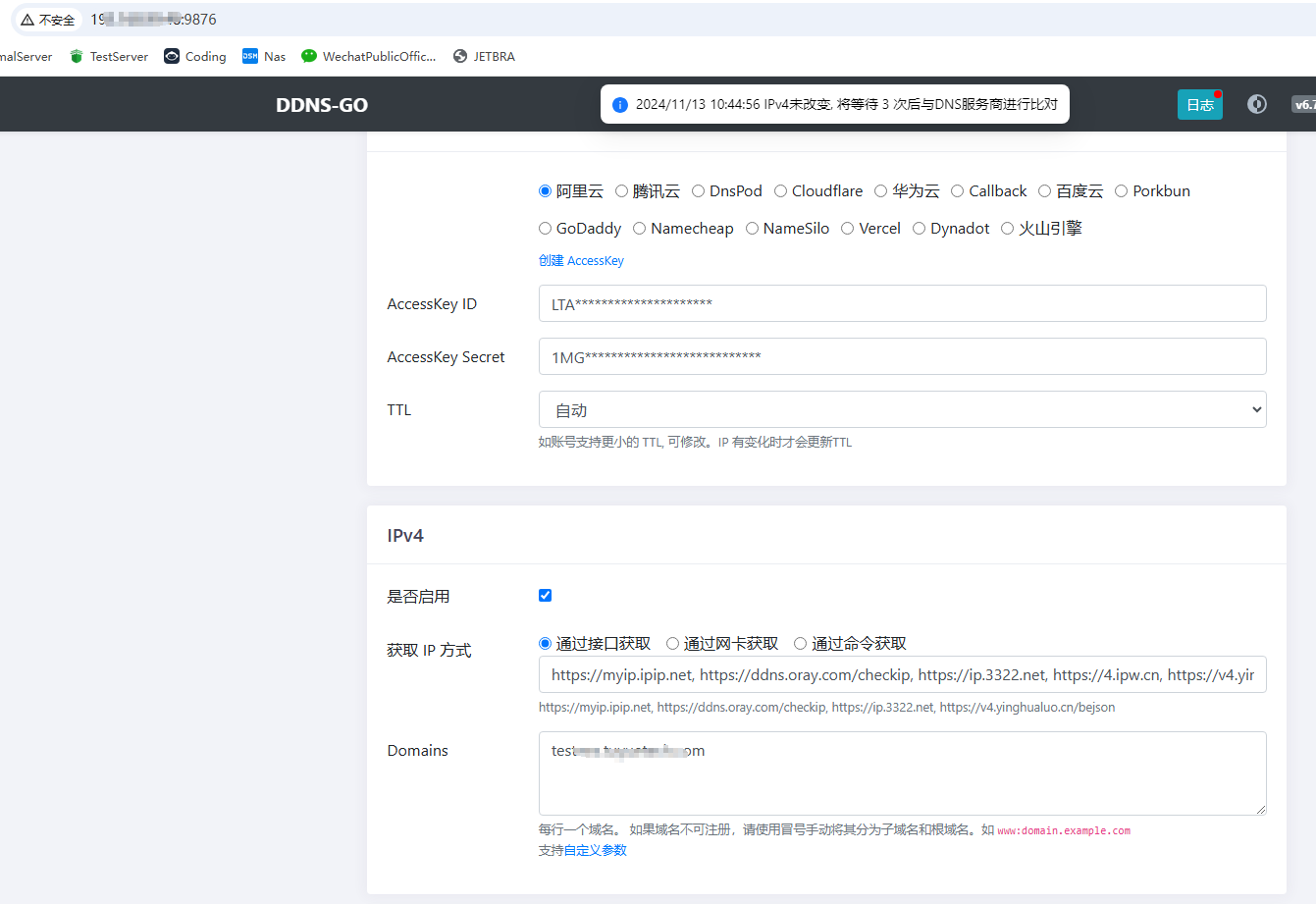
ddns-go实现域名动态解析公网IP+公网访问虚拟机内多项目 ddns-go: GitHub - jeessy2/ddns-go: Simple and easy to use DDNS. Support Aliyun, Tencent Cloud, Dnspod, Cloudflare, Callback, Huawei Cloud, Baidu Cloud, Porkbun, GoDaddy, Namecheap, NameSilo...前言公司买了一台服务器后需要将原先阿里云的测试机上部署的站点迁移到公司内,正好有公网IP,只不过是动态的需要借助技术实现域名动态dns解析。内容实现效果:主机开放380作为http协议端口,转发端口到虚拟机的80。主机开放3443作为https协议端口,转发端口到虚拟机的443。通过域名http://A.com:380或https://A.com:3443访问虚拟机的项目A通过域名http://B.com:380或https://B.com:3443访问虚拟机的项目B直接通过文件运行的方式比docker方便的多。./ddns-go -s install -f 600 -c /Users/name/.ddns_go_config.yaml运行后访问虚拟机的http://192.168.99.48:9876/进入ddns-go的控制面板,配置一下信息。配置完事使用Itdog进行ping域名测试域名已经成功解析到公司的公网IP上了。虚拟机内使用宝塔配置一下域名即可。域名描述https://xxx:3443/HTTPS协议http://xxx:380/HTTP协议
-
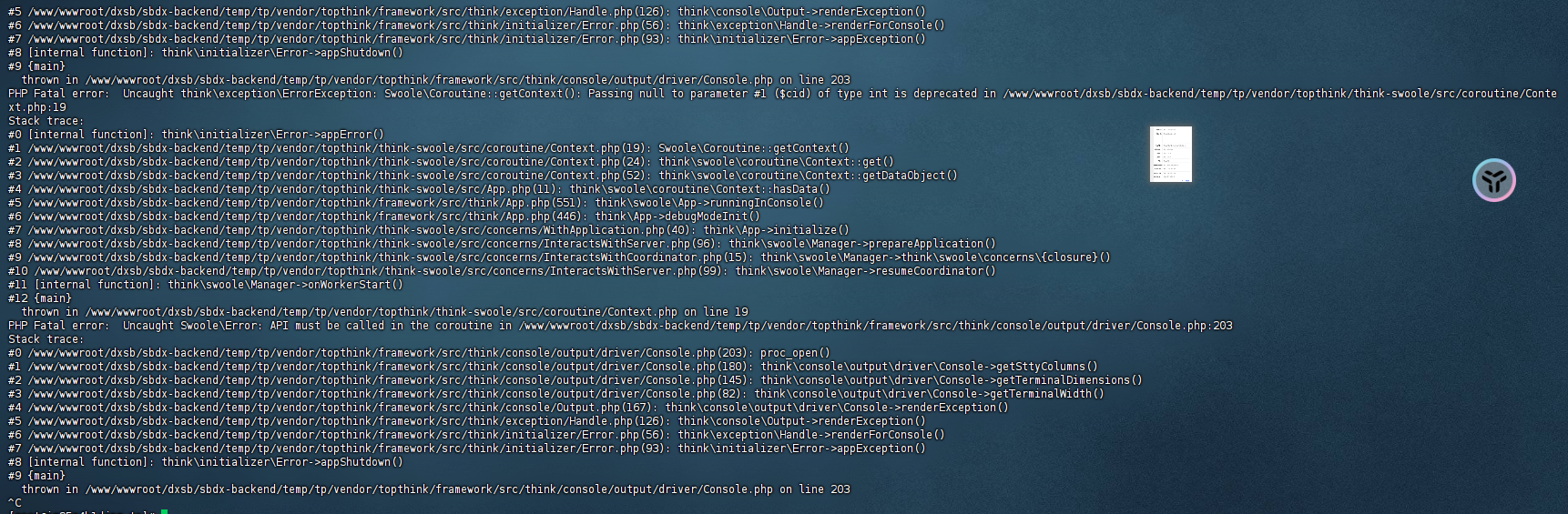
thinkphp-swoole运行报错和wss无法访问的问题 thinkphp-swoole运行报错和wss无法访问的问题thinkphp6.0项目,在运行swoole服务时log日志疯狂报错$ php think swoole restart整了好几个小时结果是php版本问题,当时默认切到了php8...更换命令为73就好了$ /www/server/php/73/bin/php think swoole restart运行起来后ws:协议正常访问,wss无法访问问题如下:You are trying to use the same port (8090) for ws:// and wss:// - this will most likely not work. While you don't show any server side configuration I suspect that your websocket server on port 8090 can only do plain WebSockets (i.e. ws:// and not wss://) and that you expect the TLS from the HTTP server (port 443) to be magically applied to wss:// on port 8090 too. This is not the case. By trying wss:// with port 8090 you are instead trying to do a TLS handshake with a server which does not speak TLS, which then results in net::ERR_SSL_PROTOCOL_ERROR.The common setup is instead to use a web server like nginx or Apache as reverse proxy for the websocket server and terminate the TLS at the web server. This way both ws:// and wss:// work on the standard ports (i.e. 80 and 443) from outside and the internet plain websocket server on port 8090 is will be made unreachable from outside. See for example NGINX to reverse proxy websockets AND enable SSL (wss://)? or WebSocket through SSL with Apache reverse proxy for how to setup something like this.需要为项目配置一个反向代理 #REWRITE-START URL重写规则引用,修改后将导致面板设置的伪静态规则失效 include /www/server/panel/vhost/rewritexxxx.conf; #REWRITE-END location /app { proxy_pass http://127.0.0.1:9999; proxy_http_version 1.1; proxy_set_header Upgrade $http_upgrade; proxy_set_header Connection "upgrade"; proxy_set_header Host $host; proxy_set_header X-Real-IP $remote_addr; proxy_set_header X-Forwarded-For $proxy_add_x_forwarded_for; proxy_set_header X-Forwarded-Proto $scheme; proxy_buffering off; proxy_request_buffering off; } #禁止访问的文件或目录 location ~ ^/(\.user.ini|\.htaccess|\.git|\.env|\.svn|\.project|LICENSE|README.md)引用1.WebSocket error: net::ERR_SSL_PROTOCOL_ERROR: https://stackoverflow.com/questions/59542929/websocket-error-neterr-ssl-protocol-error
-
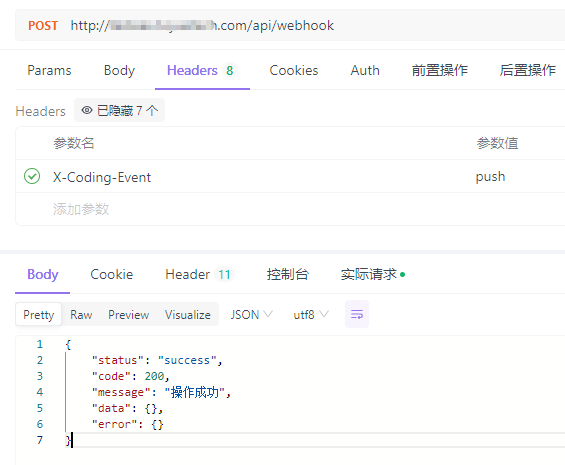
Laravel对接Coding仓库WebHooks实现自动部署 上下文环境都是基于宝塔的,因为Bash操作都使用的www用户,其他环境并不适用项目执行bash主要使用的是exec函数,项目跑在nginx上。nginx使用的用户为www,所以会有权限问题权限解决:vim /etc/sudoers # 文件内容如下 # www ALL=(ALL) NOPASSWD: /usr/bin/git # + # www ALL=(www) NOPASSWD: /www/server/php/81/bin/php /usr/local/bin/composer install # + 第一行配置:允许用户www以任何用户身份运行/usr/bin/git命令,而无需输入密码。 第二行配置:允许用户www以自身身份运行指定的composer install命令,而无需输入密码。路由:/** * 处理WebHook的请求 * 自动化部署 */ Route::post('webhook', [App\Http\Controllers\Deploy\WebHookController::class, 'handle']); 控制器:解释: 当发现仓库有push操作后,自动执行git pull拉取代码,然后执行composer install安装依赖class WebHookController extends Controller { /** * 监听Coding仓库代码更新操作 * 自动部署最新版项目 * @return \Illuminate\Http\JsonResponse|\Illuminate\Http\Resources\Json\JsonResource */ public function handle(Request $request) { Log::info('接收到Coding WebHook', [$request]); $hookEvent = $request->header('X-Coding-Event'); if (!\Str::contains($hookEvent, 'push')) return \Response::ok(); Log::info("开始执行自动部署任务"); // Git Pull exec('cd .. && sudo git pull' . ' 2>&1', $output, $status); if ($status != 0) { Log::error('拉取代码失败', [$output, $status]); \Response::fail('拉取代码失败', ResponseCodeEnum::SYSTEM_ERROR); } Log::info("拉取代码成功", [$output, $status]); // Composer Install exec('cd .. && /www/server/php/81/bin/php /usr/local/bin/composer install' . ' 2>&1', $output, $status); if ($status != 0) { Log::error('composer安装失败', [$output, $status]); \Response::fail('composer安装失败', ResponseCodeEnum::SYSTEM_ERROR); } Log::info("composer安装成功", [$output, $status]); // 后端完成部署 Log::info("自动部署任务执行完毕"); return \Response::ok(); } }模拟:Coding公司的项目使用腾讯旗下的Coding来管理项目,也是有WebHook的功能引用1.Coding WebHook:https://coding.net/help/docs/project-settings/open/webhook.html2.如何实现Git Push之后自动部署到服务器?:https://blog.csdn.net/ll15982534415/article/details/136669152
-
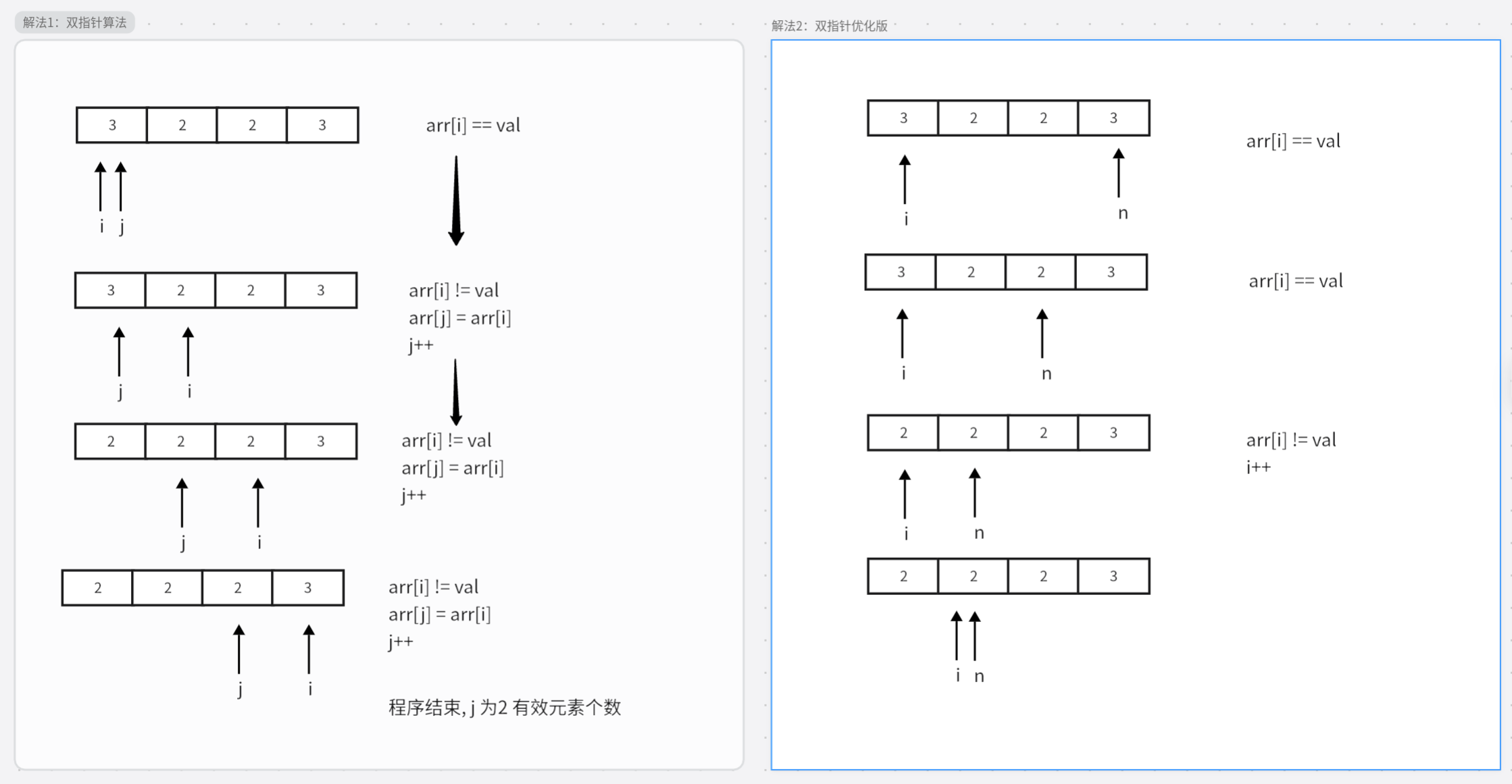
力扣每日一题-27. 移除元素 给你一个数组 nums 和一个值 val,你需要 原地 移除所有数值等于 val 的元素。元素的顺序可能发生改变。然后返回 nums 中与 val 不同的元素的数量。假设 nums 中不等于 val 的元素数量为 k,要通过此题,您需要执行以下操作:更改 nums 数组,使 nums 的前 k 个元素包含不等于 val 的元素。nums 的其余元素和 nums 的大小并不重要。返回 k。解法1: 双指针算法public class Main { public static void main(String[] args) { int[] nums = new int[]{3, 2, 2, 3}; int result = removeElement(nums, 3); System.out.println(result); } // 解法1:双指针算法 public static int removeElement(int[] nums, int val) { int k = 0; for (int i = 0 ; i < nums.length;i ++){ if(nums[i] != val) nums[k++] = nums[i]; } return k; } // 解法2: 双指针优化算法 public static int removeElement(int[] nums, int val) { int n = nums.length; int u = 0; while (u < n) { if (nums[u] == val) nums[u] = nums[n-- - 1]; else u++; } return u; } }引用原题:https://leetcode.cn/problems/remove-element/description/?envType=study-plan-v2&envId=top-interview-150
-
-
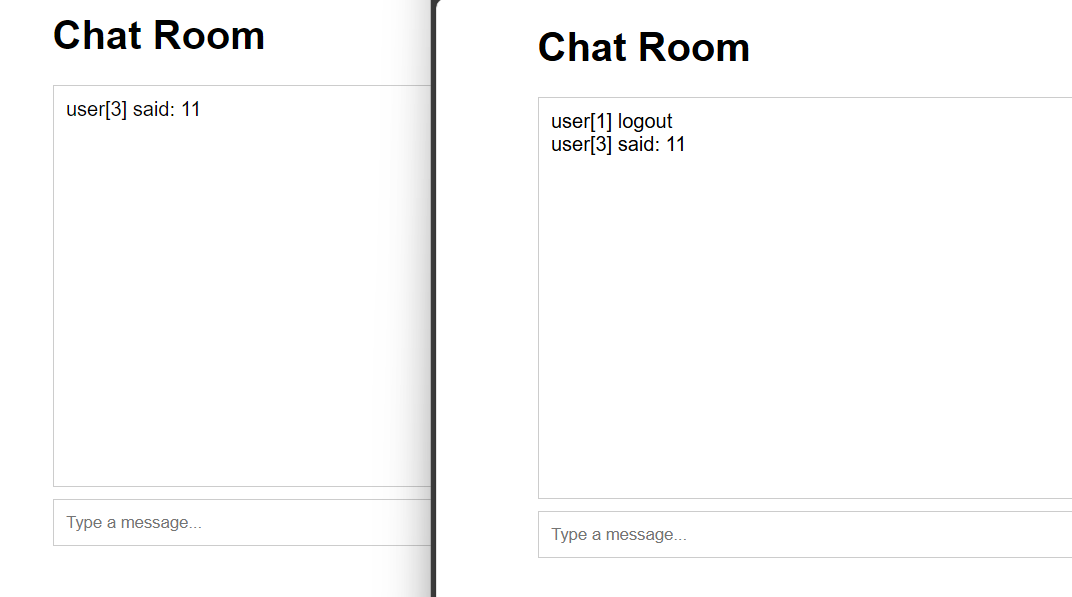
用workman框架开发网络聊天室(PHP) 任意位置建立项目目录如 SimpleChat/进入目录执行 composer require workerman/workerman然后编写一个chat.php:<?php use Workerman\Worker; use Workerman\Connection\TcpConnection; require_once __DIR__ . '/vendor/autoload.php'; $global_uid = 0; // 当客户端连上来时分配uid,并保存连接,并通知所有客户端 function handle_connection($connection) { global $text_worker, $global_uid; // 为这个连接分配一个uid $connection->uid = ++$global_uid; } // 当客户端发送消息过来时,转发给所有人 function handle_message(TcpConnection $connection, $data) { global $text_worker; foreach($text_worker->connections as $conn) { $conn->send("user[{$connection->uid}] said: $data"); } } // 当客户端断开时,广播给所有客户端 function handle_close($connection) { global $text_worker; foreach($text_worker->connections as $conn) { $conn->send("user[{$connection->uid}] logout"); } } // 创建一个文本协议的Worker监听2347接口 $text_worker = new Worker("websocket://0.0.0.0:2347"); // 只启动1个进程,这样方便客户端之间传输数据 $text_worker->count = 1; $text_worker->onConnect = 'handle_connection'; $text_worker->onMessage = 'handle_message'; $text_worker->onClose = 'handle_close'; Worker::runAll(); 前端页面:<!DOCTYPE html> <html lang="en"> <head> <meta charset="UTF-8"> <meta name="viewport" content="width=device-width, initial-scale=1.0"> <title>WebSocket Chat Room</title> <style> body { font-family: Arial, sans-serif; } #chat { width: 90%; max-width: 600px; margin: 0 auto; } #messages { border: 1px solid #ccc; height: 300px; overflow-y: scroll; padding: 10px; } #input { display: flex; margin-top: 10px; } #input input { flex: 1; padding: 10px; border: 1px solid #ccc; } #input button { padding: 10px; border: 1px solid #ccc; background: #007BFF; color: white; cursor: pointer; } </style> </head> <body> <div id="chat"> <h1>Chat Room</h1> <div id="messages"></div> <div id="input"> <input type="text" id="messageInput" placeholder="Type a message..."> <button onclick="sendMessage()">Send</button> </div> </div> <script> const ws = new WebSocket('ws://localhost:2347'); const messagesDiv = document.getElementById('messages'); const messageInput = document.getElementById('messageInput'); ws.onopen = () => { console.log('Connected to the chat server'); }; ws.onmessage = (event) => { const message = document.createElement('div'); message.textContent = event.data; messagesDiv.appendChild(message); messagesDiv.scrollTop = messagesDiv.scrollHeight; }; function sendMessage() { const message = messageInput.value; if (message) { ws.send(message); messageInput.value = ''; } } messageInput.addEventListener('keydown', (event) => { if (event.key === 'Enter') { sendMessage(); } }); </script> </body> </html> 最后使用 php chat.php运行
-
-
laravel jwt 无感刷新token 为保证和前端交互过程中,用户可以自动刷新token创建一个中间件文件,命名为 RefreshToken<?php namespace App\Http\Middleware; use Auth; use Closure; use Tymon\JWTAuth\JWTAuth; use Tymon\JWTAuth\Exceptions\JWTException; use Tymon\JWTAuth\Http\Middleware\BaseMiddleware; use Tymon\JWTAuth\Exceptions\TokenExpiredException; use Symfony\Component\HttpKernel\Exception\UnauthorizedHttpException; class RefreshToken extends BaseMiddleware { function handle($request, Closure $next) { // 检查此次请求中是否带有 token,如果没有则抛出异常。 $this->checkForToken($request); // 使用 try 包裹,以捕捉 token 过期所抛出的 TokenExpiredException 异常 try { // 检测用户的登录状态,如果正常则通过 if ($this->auth->parseToken()->authenticate()) { return $next($request); } throw new UnauthorizedHttpException('jwt-auth', '未登录'); } catch (TokenExpiredException $exception) { // 此处捕获到了 token 过期所抛出的 TokenExpiredException 异常,我们在这里需要做的是刷新该用户的 token 并将它添加到响应头中 try { /* * token在刷新期内,是可以自动执行刷新获取新的token的 * 当JWT_BLACKLIST_ENABLED=false时,可以在JWT_REFRESH_TTL时间内,无限次刷新使用旧的token换取新的token * 当JWT_BLACKLIST_ENABLED=true时,刷新token后旧的token即刻失效,被放入黑名单 * */ // 刷新用户的 token $token = $this->auth->refresh(); // 使用一次性登录以保证此次请求的成功 Auth::guard('api')->onceUsingId($this->auth->manager()->getPayloadFactory()->buildClaimsCollection()->toPlainArray()['sub']); } catch (JWTException $exception) { // 如果捕获到此异常,即代表 refresh 也过期了,用户无法刷新令牌,需要重新登录。 throw new UnauthorizedHttpException('jwt-auth', $exception->getMessage()); } } // 在响应头中返回新的 token return $this->setAuthenticationHeader($next($request), $token); } }修改App\Http\Kernel.pho文件protected $routeMiddleware = [ //...... 'token.refresh' => \App\Http\Middleware\RefreshToken::class, //...... ];修改routes.api.php文件// 需要 token 验证的接口 $api->group(['middleware' => ['token.refresh','auth.jwt']], function($api) { //....... });修改.env文件#Jwt JWT_SECRET=HSKxIUfwCdJj5gadbqfQo5im9zje95g9 #token有效时间,单位:分钟, 有效时间调整为2个小时 JWT_TTL=120 #为了使令牌无效,您必须启用黑名单。如果不想或不需要此功能,请将其设置为 false。 #当JWT_BLACKLIST_ENABLED=false时,可以在JWT_REFRESH_TTL时间内,无限次刷新使用旧的token换取新的token #当JWT_BLACKLIST_ENABLED=true时,刷新token后旧的token即刻失效,被放入黑名单 JWT_BLACKLIST_ENABLED=true #当多个并发请求使用相同的JWT进行时,由于 access_token 的刷新 ,其中一些可能会失败,以秒为单位设置请求时间以防止并发的请求失败。 #时间为10分钟,10分钟之内可以拿旧的token换取新的token。当JWT_BLACKLIST_ENABLED为true时,可以保证不会立即让token失效 JWT_BLACKLIST_GRACE_PERIOD=6005.备注:JWT token的三个时间,config/jwt.php查看a.有效时间,有效是指你获取token后,在多少时间内可以凭这个token去获取资源,逾期无效。'ttl' => env('JWT_TTL', 60), //单位分钟b.刷新时间,刷新时间指的是在这个时间内可以凭旧 token 换取一个新 token。例如 token 有效时间为 60 分钟,刷新时间为 20160 分钟,在 60 分钟内可以通过这个 token 获取新 token,但是超过 60 分钟是不可以的,然后你可以一直循环获取,直到总时间超过 20160 分钟,不能再获取。这里要强调的是,是否在刷新期可以一直用旧的token获取新的token,这个是由blacklist_enabled这个配置决定的,这个是指是否开启黑名单,默认是开启的,即刷新后,旧token立马加入黑名单,不可在用。'refresh_ttl' => env('JWT_REFRESH_TTL', 20160),c.宽限时间,宽限时间是为了解决并发请求的问题,假如宽限时间为 0s ,那么在新旧 token 交接的时候,并发请求就会出错,所以需要设定一个宽限时间,在宽限时间内,旧 token 仍然能够正常使用// 宽限时间需要开启黑名单(默认是开启的),黑名单保证过期token不可再用 'blacklist_enabled' => env('JWT_BLACKLIST_ENABLED', true) // 设定宽限时间,单位:秒 'blacklist_grace_period' => env('JWT_BLACKLIST_GRACE_PERIOD', 600)
-
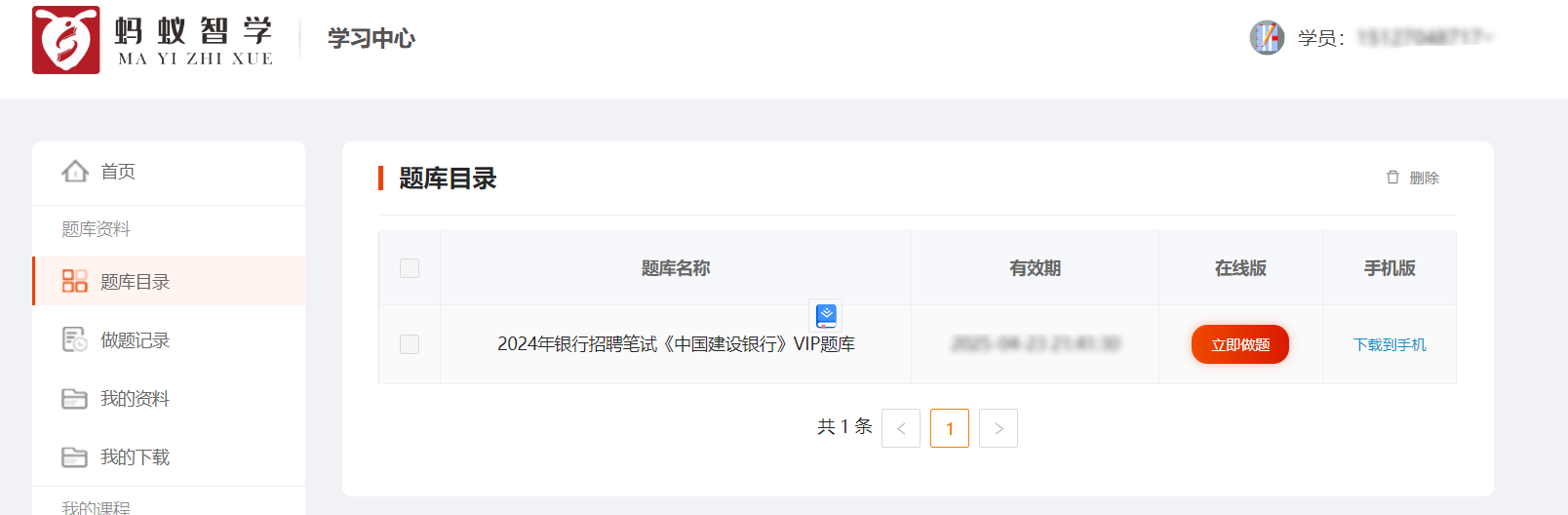
蚂蚁智学题库爬虫并整理到Excel 接的小私活,目标爬取下来题库并整理到Excel里。目标站点:https://www.mayizhixue.cn/{cloud title="蚂蚁智学" type="bd" url="https://pan.baidu.com/s/1pjg1vTojaazfebpCT1J9SQ?pwd=d2nv" password="d2nv"/}import requests from openpyxl import Workbook from openpyxl.utils import get_column_letter from openpyxl import load_workbook import os common_headers = { 'Authorization': 'TOKEN', } record_id = 1 wb = load_workbook(filename='sample.xlsx') ws = wb.active rows = ws.rows def get_target_row_number(): rows = ws.rows idx = 1 for row in rows: # for cell in row: # print(cell.value, end=' ') # print() if row[0].value is None: return idx idx = idx + 1 return idx def write_row(row, kIndex=None): global record_id rowNumber = get_target_row_number() # print(f"当前行数:{rowNumber}") if kIndex is None: ws.cell(row=rowNumber, column=1).value = record_id else: ws.cell(row=rowNumber, column=1).value = str(record_id) + '.' + str(kIndex) ws.cell(row=rowNumber, column=2).value = row.get('title', '') ws.cell(row=rowNumber, column=3).value = row.get('type', '') # ws.cell(row=rowNumber, column=4).value = row.get('type') # 分数 # ws.cell(row=rowNumber, column=5).value = row.get('type') # 难度 option_idx = 0 for option in row.get('options', []): if 6 + option_idx >= 11: break ws.cell(row=rowNumber, column=6 + option_idx).value = option option_idx = option_idx + 1 ws.cell(row=rowNumber, column=11).value = row.get('answer', '') ws.cell(row=rowNumber, column=12).value = row.get('analysis', '') if kIndex is None: record_id = record_id + 1 def map_type_kv(key): # 1-单选题 2-多选题 6-共享题干题 type = '单选题' if key in ('1', 1): type = '单选题' elif key in ('2', 2): type = '多选题' elif key in ('3', 3): type = '不定项选择题' elif key in ('4', 4): type = '判断题' elif key in ('6', 6): type = '材料题' else: print('不支持的类型:%s' % key) exit() return type def get_test_question(sectionId): params = { 'sectionId': sectionId, 'type': '2', } response = requests.get('https://wx.yiwenjy.cn/yunlian_pc/querySubjectList', params=params, headers=common_headers).json() data = response.get('data') handle_data_2_excel(data) def handle_data_2_excel(data): for i in data: # 此时 i 为对象,取出所有key并遍历 for key in i.keys(): type = map_type_kv(key) # 开始遍历这一题型的所有题目 if type in ['单选题', '多选题', '不定项选择题', '判断题']: for j in i.get(key): row = { 'title': j.get('issue'), 'type': type, 'options': [], 'answer': j.get('answer'), 'analysis': j.get('analysis') } options = j.get('sOption') # 使用|分割选项 options = options.split('|') for k in options: # j为A.选项内容 所以取第三个字符开始 row['options'].append(k[2:]) write_row(row) elif type == '材料题': for j in i.get(key): row = { 'title': j.get('stem'), 'type': type } write_row(row) # 开始爬下面的point kIndex = 1 for k in j.get('childre', []): subtype = map_type_kv(k.get('subType')) row = { 'title': k.get('issue'), 'type': subtype, 'options': [], 'answer': k.get('answer'), 'analysis': k.get('analysis') } options = k.get('sOption') # 使用|分割选项 options = options.split('|') for opt in options: # j为A.选项内容 所以取第三个字符开始 row['options'].append(opt[2:]) write_row(row, kIndex) kIndex = kIndex + 1 def get_exam_question(paperId): response = requests.get( 'https://wx.yiwenjy.cn/yunlian_pc/queryoPaperSubjectList', params={ 'paperId': paperId, 'mode': '2' }, headers=common_headers).json() data = response.get('data') handle_data_2_excel(data) def get_catalogue(courseName, courseId): response = requests.get('https://wx.yiwenjy.cn/yunlian_pc/querySectionList', params={ 'courseId': courseId }, headers=common_headers).json() data = response.get('data') for i in data: print(f"当前章节ID:{i.get('id')},章节名称:{i.get('sectionName')}") # 创建相关文件夹 if not os.path.exists(courseName + '/' + i.get('sectionName')): os.makedirs(courseName + '/' + i.get('sectionName')) # 这里需要一直向下判断是否有子节点 copy_i = i # dfs算法 access_next_level(courseName + "/", copy_i) def access_next_level(path, item): global wb, ws, rows, record_id # dfs算法 开始不断找下级 向上返回 if item.get('children') is not None: path = path + item.get('sectionName') + '/' for i in item.get('children'): access_next_level(path, i) else: print(f"当前小节ID:{item.get('id')},小节名称:{item.get('sectionName')}") record_id = 1 wb = load_workbook(filename='sample.xlsx') ws = wb.active rows = ws.rows get_test_question(item.get('id')) # 判断目录是否存在 if not os.path.exists(path): os.makedirs(path) wb.save(f'{path}/{item.get("sectionName")}.xlsx') def get_product_course_info(id): response = requests.get('https://wx.yiwenjy.cn/yunlian_pc/queryProductCourse', params={ 'id': id }, headers=common_headers).json() data = response.get('data') """ 每个ITEM courseName:"中国建设银行VIP" examId:"43d8625d21614cab9f6a2e323e0cd4db" id:"1686999432228376576" """ return data def query_paper_type_list(id): response = requests.get('https://wx.yiwenjy.cn/yunlian_pc/queryPaperTypeList', params={ 'courseId': id }, headers=common_headers).json() """ "id": "1", "paperTypeName": "章节练习", "icon": null, "version": null, "isSection": null, "hasSection": null """ return response.get('data') def get_li_nian_zhen_ti_list(id, paperTypeId): response = requests.get('https://wx.yiwenjy.cn/yunlian_pc/queryPaperList', params={ 'courseId': id, 'paperTypeId': paperTypeId }, headers=common_headers).json() """ 每个ITEM "id": "1703299201187844096", "paperName": "2022年银行招聘笔试《中国建设银行》试题", "onlineTime": "2023-09-17 00:00:00", "referenNumber": 139, "tryBuy": 1, "hasMake": 3, "mode": null """ return response.get('data') course = [ {'id': 'f753f9934c60427fadfba664229a8487', 'name': '2024年军队文职人员招聘《公共科目》题库'} ] for courseItem in course: # 创建科目的文件夹 if not os.path.exists(courseItem.get('name')): os.makedirs(courseItem.get('name')) product_course_info = get_product_course_info(courseItem.get('id')) for product_course in product_course_info: # 查询当前科目下的试卷类型列表 paper_type_list = query_paper_type_list(product_course.get('id')) for paper_type in paper_type_list: print(f"当前科目:{product_course.get('courseName')},当前试卷类型:{paper_type.get('paperTypeName')}") if paper_type.get('paperTypeName') == '章节练习': get_catalogue(courseItem.get("name"), product_course.get('id')) elif paper_type.get('paperTypeName') in ('历年真题', '考前点题', '模拟试卷', '预测试卷', '考前点题'): li_nian_zhen_ti_list = get_li_nian_zhen_ti_list(product_course.get('id'), paper_type.get('id')) for li_nian_zhen_ti in li_nian_zhen_ti_list: record_id = 1 wb = load_workbook(filename='sample.xlsx') ws = wb.active rows = ws.rows print(f"当前试卷ID:{li_nian_zhen_ti.get('id')},试卷名称:{li_nian_zhen_ti.get('paperName')}") get_exam_question(li_nian_zhen_ti.get('id')) wb.save( f'{courseItem.get("name")}/{courseItem.get("name")}-{li_nian_zhen_ti.get("paperName")}.xlsx') else: print("不支持的试卷类型:%s" % paper_type.get('paperTypeName')) exit()